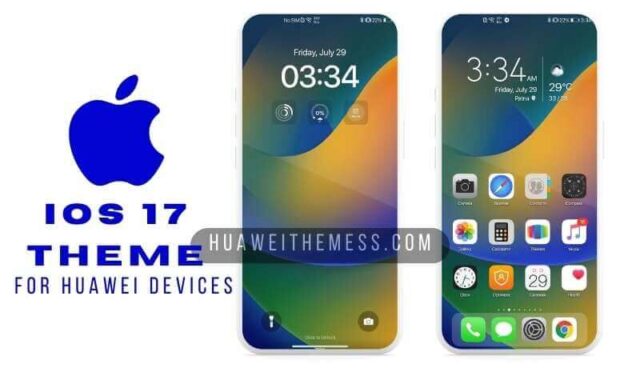
The iPhone 13 theme on Huawei devices marks a significant milestone in mobile design, bringing the coveted iOS 15 aesthetic to your EMUI 12 device. This cutting-edge update offers a premium feel that redefines the mobile experience, outshining industry standards.
Immersive iPhone 13 EMUI Theme Features Unveiled
This revolutionary theme boasts an array of exciting features, including state-of-the-art iOS 13 wallpapers, sleek icons, and an iPhone 13 app look that’s set to turn heads. Additionally, the inclusion of cool widgets and bug fixes ensures seamless device performance. Whether you’re a fan of the latest iOS trends or desire a fresh new look for your EMUI 12 device, this theme is the perfect solution.
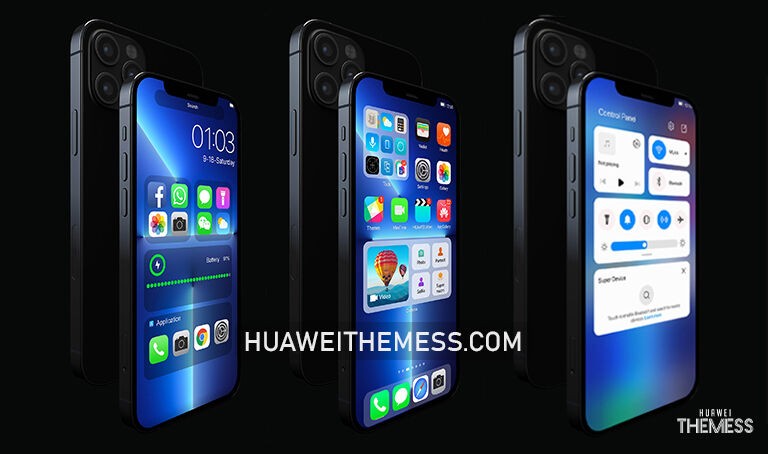
The iPhone 13 theme is meticulously designed to meet the evolving needs of Huawei and Honor device users, providing a consistent and enjoyable experience across all supported platforms. Its sleek iOS 15 aesthetic makes it a perfect fit for those seeking to elevate their mobile experience.
EMUI 12, HarmonyOS 2, and MagicUI 4/3 Compatibility Guaranteed
This iPhone 13 theme is designed to work seamlessly on EMUI 12, HarmonyOS 2, and MagicUI 4/3 devices, ensuring a consistent and enjoyable experience across all supported platforms. Whether you’re running the latest version of EMUI or MagicUI, you can rest assured that this theme will look and perform flawlessly.



Frequently Asked Questions (FAQ)
What devices is the iPhone 13 theme compatible with?
The iPhone 13 theme is designed to work seamlessly on EMUI 12, HarmonyOS 2, and MagicUI 4/3 devices, making it a perfect solution for a wide range of Huawei and Honor devices.
How do I apply the iPhone 13 theme?
To apply the theme, simply download the .hwt file, move it to the Huawei/Themes folder, and then apply it via the Themes app. For more detailed instructions, check out our guide on how to install a theme on your Huawei device.
Is the iPhone 13 theme available for free download?
Yes, the iPhone 13 theme is available for free download from our website. Simply click on the download button and follow the prompts to get started.
How to install this theme?
First, download the .hwt file and move it to the Huawei/Themes folder, then apply it via the Themes app. Click here to learn in detail
The iPhone 13 theme is a masterclass in design and functionality, offering a unique blend of style, sophistication, and seamless performance. With its sleek iOS 15 aesthetic and compatibility with EMUI 12, HarmonyOS 2, and MagicUI 4/3 devices, this theme is a must-have for anyone looking to elevate their mobile experience.