
GongYe is a stunning new theme that brings a unique blend of dark purple and sleek design elements to your EMUI 10/9 or MagicUI 3/2 device. This theme is perfect for those who want to add a touch of sophistication and elegance to their phone’s look and feel.
GongYe on your Huawei Device: Where Elegance Meets Functionality
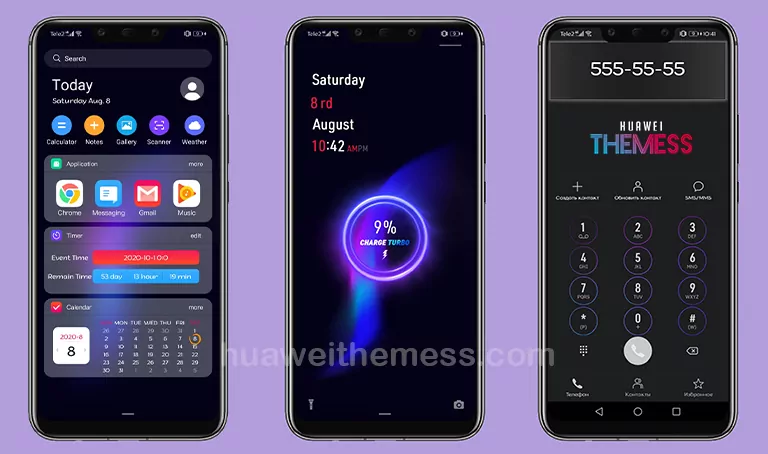
The GongYe theme boasts a beautiful, dark purple color scheme that perfectly complements the EMUI 10/9 and MagicUI 3/2 interfaces. With its sleek design elements and attention to detail, this theme is sure to impress even the most discerning users.
Compatibility and System Requirements
The GongYe theme is compatible with EMUI 10.1/10/9.1/9.0 and MagicUI 3/2 devices. This means that users can enjoy the benefits of this stunning theme on a wide range of Huawei devices.



Frequently Asked Questions (FAQ)
What devices are compatible with the GongYe theme?
The GongYe theme is compatible with EMUI 10.1/10/9.1/9.0 and MagicUI 3/2 devices.
How can I download the GongYe theme?
You can download the GongYe theme by clicking on the link provided on the Huawei Themes website.
Do I need to restart my device after applying the theme?
Yes, it is recommended to restart your device after applying the GongYe theme to ensure that all changes take effect.
How to install this theme?
First, download the .hwt file and move it to the Huawei/Themes folder, then apply it via the Themes app. Click here to learn in detail.
The GongYe theme is a must-have for anyone looking to add a touch of elegance and sophistication to their EMUI 10/9 or MagicUI 3/2 device. With its stunning dark purple color scheme and sleek design elements, this theme is sure to impress even the most discerning users.



Love