
Get ready to experience the premium Apple vibe on your Huawei device with the iPhone 12A theme, now available for EMUI 11/10 and MagicUI 4/3 users. This stunning theme brings an Awesome look and style to your phone, allowing you to personalize it according to your taste. With its sleek and modern design, this theme is a must-have for anyone looking to elevate their device’s aesthetic.
iPhone 12A EMUI Theme: A Masterclass in Clean UI Design
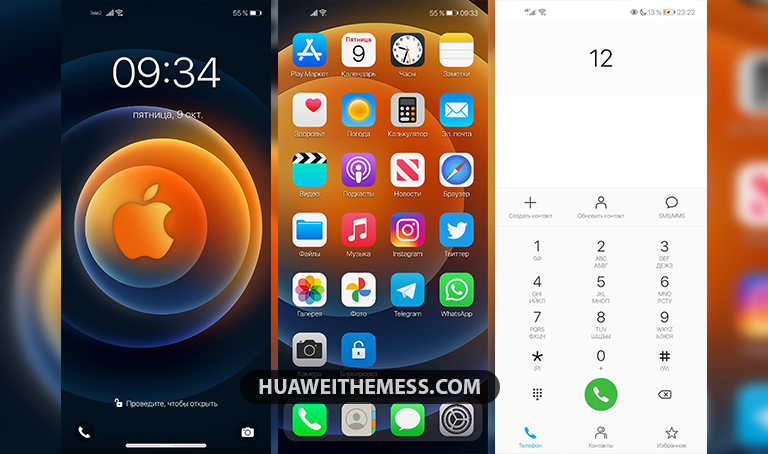
This theme boasts an impressive array of features, including iOS 14 icons, iPhone 12 wallpapers, and a cool lockscreen that will leave you wanting more. The app design has been carefully crafted to resemble the iPhone 12, giving you a seamless and authentic experience. But that’s not all – with this theme, you’ll also enjoy new colors and a bug-free interface that will make your device feel like new.
- iOS 14 Icons
- iPhone 12 Wallpapers
- Changed App Looking like iPhone 12
- Cool Lockscreen
- Bugs Fixed
- New Colors
- and more..
Compatibility: EMUI 11/10 and MagicUI 4/3
This theme is compatible with EMUI 11/10 and MagicUI 4/3, making it a great option for users of these operating systems. Whether you’re running the latest EMUI 11 or an older version like EMUI 10.1 or 10.0, this theme will work seamlessly with your device. For MagicUI 4/3 users, this theme is a great way to give your device a fresh new look.



Frequently Asked Questions (FAQ)
What devices is this theme compatible with?
[This theme is compatible with Huawei and Honor devices running EMUI 11/10 and MagicUI 4/3.]
How do I download and install this theme?
[To download and install this theme, click on the download button below, find the HWT extension (blabla.hwt) you downloaded from our site, and copy or move the theme file to the Huawei/Themes folder. Then, apply the theme via the Themes app. For more information, visit our guide on how to add a theme to your Huawei device.](Click here to learn in detail)
How do I reset the theme to its default settings?
[To reset the theme to its default settings, go to the Themes app, select the iPhone 12A theme, and click on the “Reset” button. This will restore the theme to its original settings. If you’re still experiencing issues, try restarting your device or reinstalling the theme.](Click here to learn in detail)
How to install this theme?
[First, download the .hwt file and move it to the Huawei/Themes folder, then apply it via the Themes app. Click here to learn in detail.
The iPhone 12A theme is a game-changer for anyone looking to give their device a premium Apple vibe. With its sleek design, iOS 14 icons, and cool lockscreen, this theme is a must-have for anyone who wants to elevate their device’s aesthetic. Whether you’re running EMUI 11/10 or MagicUI 4/3, this theme is a great option for giving your device a fresh new look.



🥺❤️
Nice