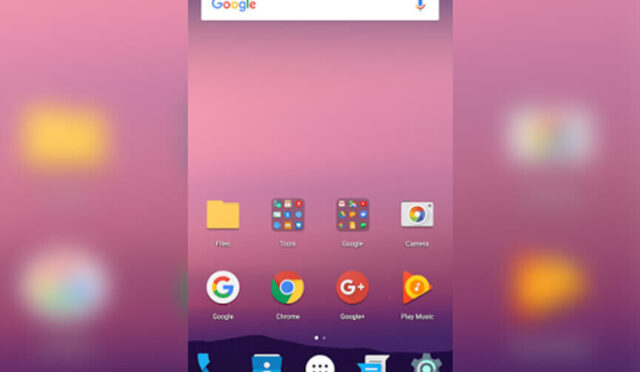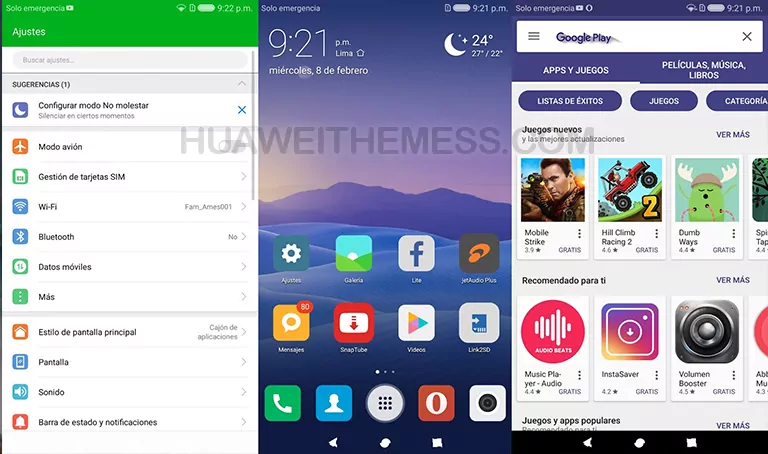
Get ready to immerse yourself in a world of serenity and sophistication with ZenUI Lite, a stunning theme for EMUI 5.0/5.1 devices. This beautifully crafted theme brings a touch of Zen to your Huawei smartphone, transforming your user experience into a seamless and delightful journey.
Discover the Essence of ZenUI on Your Huawei Device
With ZenUI Lite, you’ll be treated to a visually stunning interface that effortlessly blends simplicity and elegance. The theme boasts a range of captivating features, including:
From the sleek and modern ZenUI icons to the refined-looking apps and Navbar, every aspect of this theme has been meticulously designed to provide an unparalleled user experience. And with a range of beautifully crafted wallpapers to choose from, you’ll have the perfect canvas to showcase your unique style.
Compatibility Made Easy: Supported EMUI Versions
ZenUI Lite is specifically designed for EMUI 5.0/5.1 devices, ensuring a seamless and hassle-free installation process. Whether you’re rocking the latest EMUI 5.1 or the preceding EMUI 5.0, this theme has got you covered.
Frequently Asked Questions
What is the purpose of ZenUI Lite?
ZenUI Lite is a theme designed to bring a touch of elegance and sophistication to your Huawei EMUI 5.0/5.1 device, transforming your user experience into a seamless and delightful journey.



Is ZenUI Lite compatible with my device?
Yes, ZenUI Lite is specifically designed for EMUI 5.0/5.1 devices, ensuring a hassle-free installation process.
How do I install this theme?
First, download the .hwt file and move it to the Huawei/Themes folder, then apply it via the Themes app. Click here to learn in detail.
ZenUI Lite is more than just a theme – it’s an experience. With its stunning visuals, seamless performance, and effortless installation process, this theme is sure to captivate even the most discerning users. So why wait? Dive into the world of Zen and discover a new level of sophistication and elegance on your Huawei device.