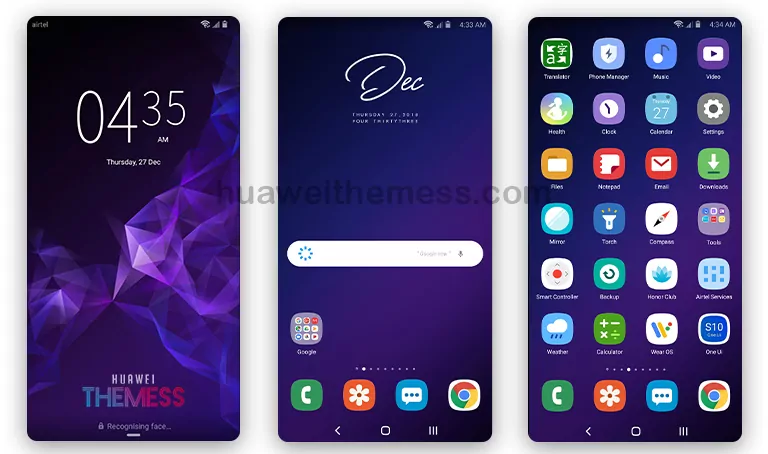
Get ready to elevate your Huawei device’s look with the SX Sublimation theme, a perfect blend of sleek design and functionality. This theme is a must-try for anyone seeking a premium Apple-inspired experience on their EMUI 8.0/8.1-powered device.
The Aesthetically Pleasing Features of SX Sublimation
The SX Sublimation theme boasts an array of captivating features that will transform your device’s overall look.
- New Flat Icons bring a modern touch to your device’s interface, ensuring seamless navigation and a clutter-free experience.
- The Abstract Wallpaper adds an extra layer of visual appeal, creating a captivating backdrop for your home screen.
- The Very Stylish Looking design language permeates every aspect of the theme, making it a standout choice for those who crave a premium look.
- The New Lockscreen feature adds an extra layer of sophistication, ensuring that your device’s security and style are perfectly balanced.
A Seamless Blend of Style and Functionality: SX Sublimation Unveiled
The SX Sublimation theme is specifically designed for EMUI 8.0/8.1, ensuring a seamless and hassle-free installation process. This theme is compatible with a wide range of Huawei devices, making it an excellent choice for those seeking a unified look across their device ecosystem.
Frequently Asked Questions (FAQ)
What are the system requirements for installing the SX Sublimation theme?
The SX Sublimation theme is compatible with EMUI 8.0/8.1 and can be installed on a wide range of Huawei devices. However, please ensure that your device meets the minimum system requirements before proceeding with the installation process.
How do I install the SX Sublimation theme on my EMUI 8.0/8.1 device?
To install the SX Sublimation theme, simply download the .hwt file and move it to the Huawei/Themes folder, then apply it via the Themes app. For a step-by-step guide on how to install themes on your Huawei device, click here.
Is the SX Sublimation theme free to download?
Yes, the SX Sublimation theme is available for free download on the Huawei Themess website. Simply click on the download button to access the theme file.
How to install this theme?
First, download the .hwt file and move it to the Huawei/Themes folder, then apply it via the Themes app. For a detailed guide on how to install themes on your Huawei device, click here.
The SX Sublimation theme is a shining example of Huawei’s commitment to delivering premium, style-driven experiences for its users. With its sleek design, captivating features, and seamless installation process, this theme is a must-try for anyone seeking to elevate their Huawei device’s look and feel.