The iOS 14 Blue theme is a stunning reimagining of the classic Apple look, now available for your Huawei or Honor device running EMUI 10.1, 10, 9.1, or 9.0, as well as MagicUI 3 or 2.
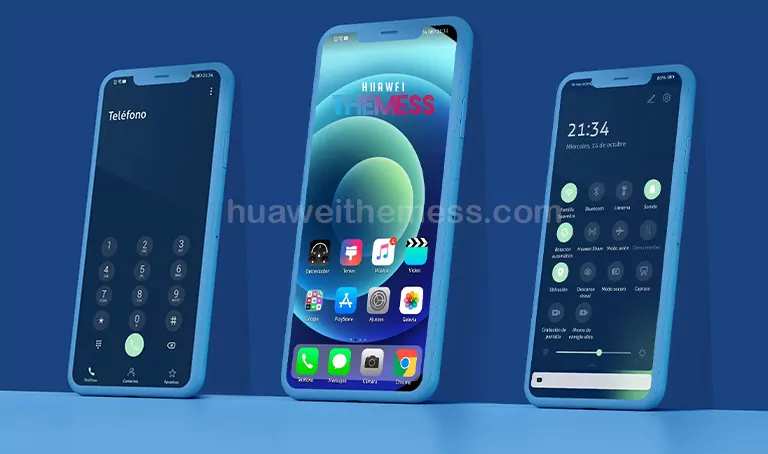
With this theme, you can give your device a premium Apple feel, complete with iOS 14 Blue Messages Icons, iOS 14 Settings Icons, iPad Air 20/iPhone 12 Blue Wallpaper, and all-new iOS system UI.
Compatibility: EMUI and MagicUI Support
This theme is designed to work seamlessly with your EMUI 10.1, 10, 9.1, or 9.0 device, as well as MagicUI 3 or 2. Simply download and apply the theme to enjoy the iOS 14 Blue look on your Huawei or Honor phone.
Frequently Asked Questions (FAQ)
What devices is this theme compatible with?
[This theme is compatible with EMUI 10.1, 10, 9.1, or 9.0 devices, as well as MagicUI 3 or 2 devices.]
How do I apply the theme?
[To apply the theme, download the .hwt file and move it to the Huawei/Themes folder, then apply it via the Themes app. Click here to learn in detail.
Is this theme free to download?
[This theme is free to download, but be sure to check the source for any additional requirements or restrictions.]
How to install this theme?
[First, download the .hwt file and move it to the Huawei/Themes folder, then apply it via the Themes app. Click here to learn in detail.]
The iOS 14 Blue theme is a must-have for anyone looking to give their Huawei or Honor device a premium Apple feel. With its stunning blue accents and sleek design, this theme is sure to impress. So why wait? Download the iOS 14 Blue theme today and experience the Apple aesthetic on your EMUI or MagicUI device.