
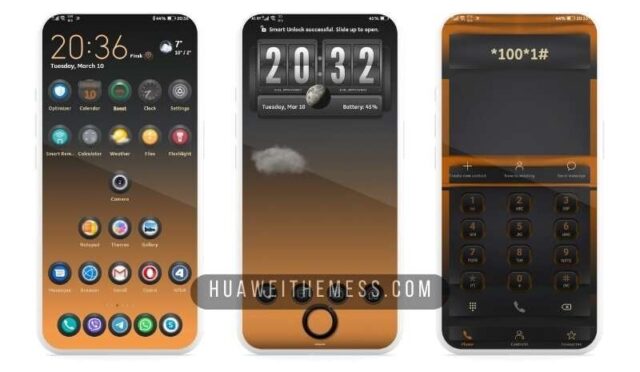
The Oktay_Usta theme for EMUI 11 and MagicUI 4 is a game-changer for those seeking to personalize their Huawei or Honor device. With a plethora of customization options, this theme allows users to tailor their phone’s look and feel to their unique taste, making it a must-try for EMUI enthusiasts.
Oktay_Usta: A Symphony of Elegance on Your EMUI Device
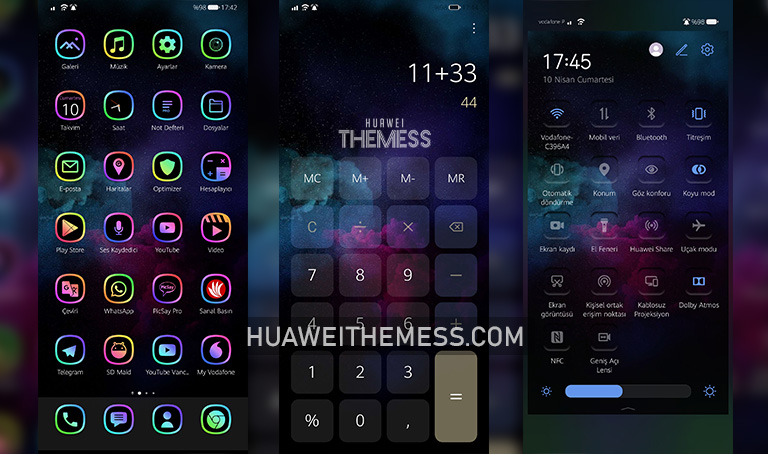
This stunning theme is characterized by gradient icons, stylish wallpapers, and a plethora of other features that blend seamlessly to create a cohesive and visually stunning design.
Whether you’re a fan of bold and vibrant colors or prefer a more subtle, elegant look, the Oktay_Usta theme has something for everyone, making it an excellent choice for those looking to elevate their EMUI experience.



Compatibility: Unlock the Full Potential of Oktay_Usta Theme
The Oktay_Usta theme is compatible with EMUI 11.1/11 and MagicUI 4, ensuring a seamless experience for users on these platforms. Whether you’re running the latest version or an earlier iteration, this theme is sure to bring a touch of sophistication to your device.
Frequently Asked Questions
What sets Oktay_Usta theme apart from other EMUI themes?
The Oktay_Usta theme stands out for its unique blend of gradient icons, stylish wallpapers, and other features, making it a standout choice for those seeking a premium EMUI experience.
Is the Oktay_Usta theme easy to install?
Yes, installing the Oktay_Usta theme is a straightforward process. Simply download the .hwt file, move it to the Huawei/Themes folder, and apply it via the Themes app.
Can I customize the look of the Oktay_Usta theme?
While the Oktay_Usta theme offers a range of customization options, users can also explore further personalization by adjusting the theme’s settings and exploring additional features.
How to install this theme?
First, download the .hwt file and move it to the Huawei/Themes folder, then apply it via the Themes app. For detailed instructions, visit our website here.
The Oktay_Usta theme is a game-changer for EMUI enthusiasts, offering a unique blend of style and functionality that elevates the user experience. With its vibrant design and seamless compatibility, this theme is an excellent choice for those seeking to revolutionize their EMUI experience.



like
some