
Get ready to revamp your Huawei device with the stunning Blooming theme, now available for EMUI 10/9 and MagicUI 3/2 users. This captivating theme brings an array of refreshing features that will breathe new life into your home screen, transforming your device into a vibrant work of art.
Vibrant Blooming EMUI Theme: A Symphony of Color and Style
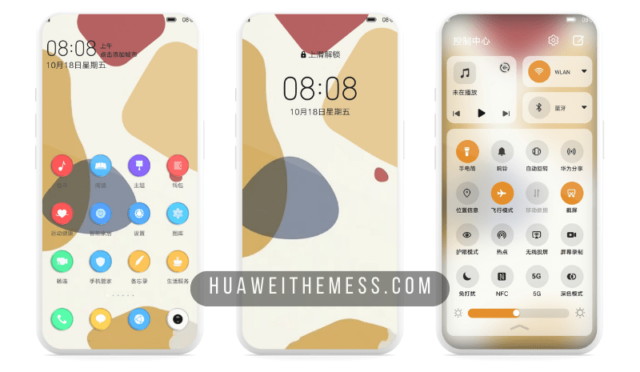
The Blooming theme is an exquisite blend of flat icons, abstract wallpapers, and colorful app looks that will leave you enchanted. With its sleek and modern design, this theme is perfect for users seeking a premium Apple experience on their Huawei devices.
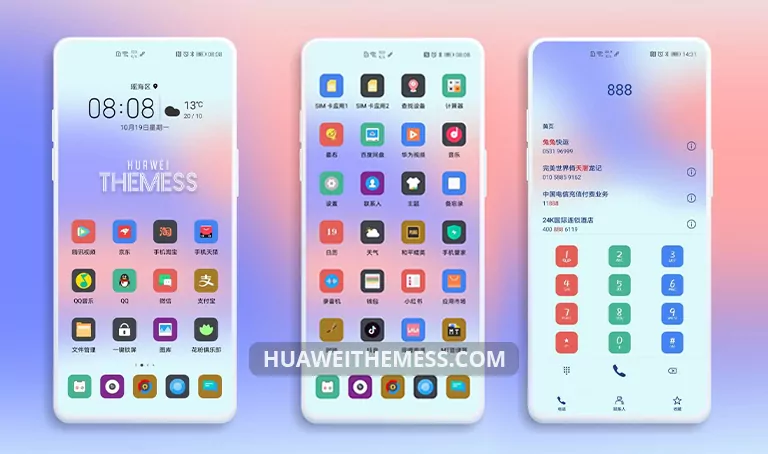
From the striking color combinations to the seamless animations, every element of the Blooming theme has been carefully crafted to provide a visually stunning experience. Say goodbye to bland screens and hello to a world of vibrant colors and elegant design.
Compatibility and Version Support
The Blooming theme is designed to work seamlessly with EMUI 10/9 and MagicUI 3/2, ensuring that you can enjoy its stunning features without any compatibility issues. This theme is perfect for users looking to upgrade their device’s aesthetic without worrying about software compatibility.



Frequently Asked Questions (FAQ)
Is the Blooming theme compatible with my device?
The Blooming theme is compatible with EMUI 10/9 and MagicUI 3/2, making it a perfect fit for users with these operating systems.
How do I apply the Blooming theme?
To apply the Blooming theme, download the .hwt file, move it to the Huawei/Themes folder, and then apply it via the Themes app. For a detailed guide, please click here.
Is the Blooming theme free to download?
The Blooming theme is available for free download on our website. Simply click the download button below to get started!
How do I install the Blooming theme?
First, download the .hwt file and move it to the Huawei/Themes folder, then apply it via the Themes app. Click here to learn in detail.
The Blooming theme is a must-have for anyone seeking to elevate their Huawei device’s aesthetic. With its stunning design and seamless animations, this theme is sure to leave you enchanted. Say goodbye to bland screens and hello to a world of vibrant colors and elegant design.



Supar