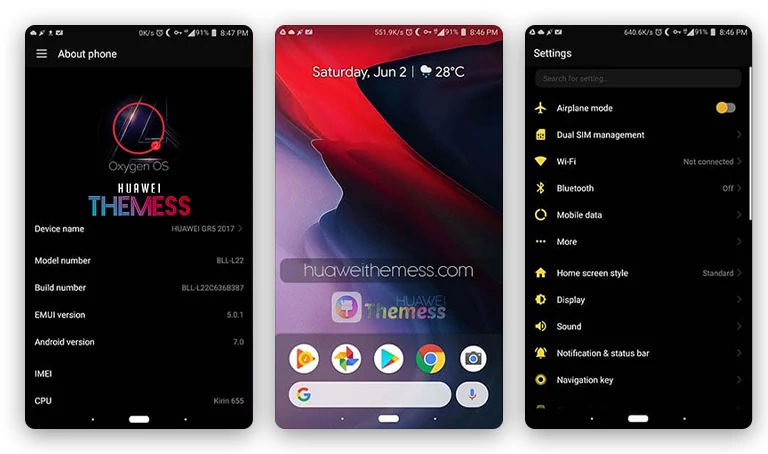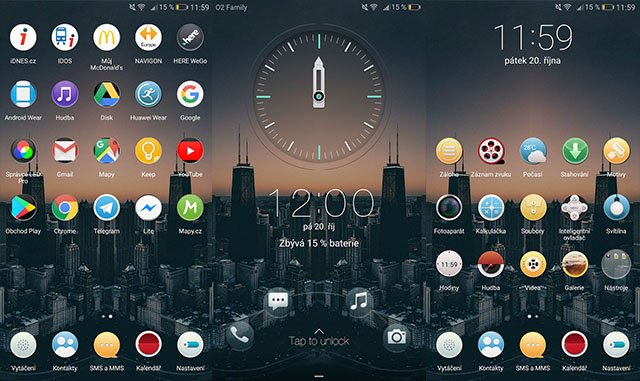
Get ready to elevate your Huawei experience with the sleek and modern Skyline theme, designed specifically for EMUI 5.0/5.1 users. This theme is perfect for those who want to give their device a premium look and feel, with its unique combination of wallpapers, icons, and lockscreen widgets.
Sleek Dark Mode & Custom Icons in Skyline Theme
The Skyline theme is packed with exciting features, including:
- Stunning Skyline Wallpapers
- Circle Icons for a fresh look
- Cool Lockscreen Widgets for added functionality
- Bugs Fixed for a smoother experience
- And more!
Compatibility with EMUI 5.0/5.1 Devices
The Skyline theme is designed to work seamlessly with EMUI 5.0 and 5.1 devices, ensuring a premium experience without any compatibility issues. Whether you’re using a Huawei P9, Mate 9, or another eligible device, this theme is sure to impress.
Frequently Asked Questions
What devices is the Skyline theme compatible with?
[The Skyline theme is compatible with EMUI 5.0 and 5.1 devices, including the Huawei P9, Mate 9, and other eligible devices.][
How do I apply the Skyline theme?
[To apply the Skyline theme, simply download the .hwt file, move it to the Huawei/Themes folder, and then apply it via the Themes app.][



How to install this theme?
[First, download the .hwt file and move it to the Huawei/Themes folder, then apply it via the Themes app. Click here to learn in detail.[
The Skyline theme is a game-changer for EMUI 5.0/5.1 users, offering a premium experience that’s hard to find elsewhere. With its sleek dark mode, custom icons, and cool lockscreen widgets, this theme is sure to transform your Huawei device into a stunning work of art. Whether you’re looking to personalize your phone or simply want a fresh new look, the Skyline theme is the perfect choice. Its unique combination of features and stunning visuals make it a must-have for anyone who wants to experience the best of Huawei’s EMUI.