
Get ready to transform your Huawei device into a sleek iPhone replica with the iPlum theme. This stunning EMUI theme is designed to bring the essence of Apple‘s design language to your Huawei device, giving you an unparalleled iPhone experience without the hefty price tag.
iPlum EMUI Theme Unveiled: A Symphony of iOS Features
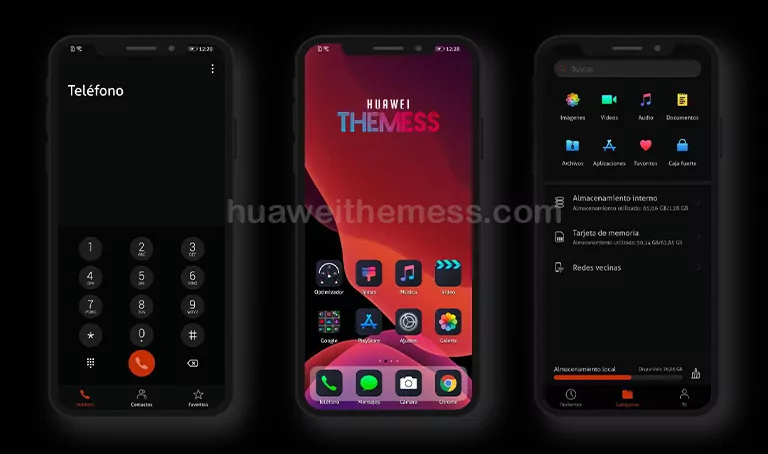
The iPlum EMUI theme boasts an array of features that will transport your device to the world of iOS. From iOS 14 dark messages icons to iPad Air 20/iPhone 12 dark wallpapers, this theme has got you covered. Other notable features include iOS 14 settings icons, new iOS icons, iPhone 12 lockscreen, and iOS 14 widgets, making it a haven for fans of the Apple ecosystem.
Compatibility Unlocked: EMUI 10/9 and MagicUI 3/2 Support
The iPlum EMUI theme is designed to work seamlessly with EMUI 10.1/10/9.1/9.0 and MagicUI 3/2 devices, ensuring a smooth and glitch-free experience. Whether you’re rocking the latest EMUI 10.1 or the earlier EMUI 9.0, this theme has got you covered.
Frequently Asked Questions
What are the supported EMUI/MagicOS versions?
The iPlum EMUI theme is compatible with EMUI 10.1/10/9.1/9.0 and MagicUI 3/2 devices.



What are the key features of the iPlum EMUI theme?
The iPlum EMUI theme boasts an array of features, including iOS 14 dark messages icons, iPad Air 20/iPhone 12 dark wallpapers, iOS 14 settings icons, new iOS icons, iPhone 12 lockscreen, and iOS 14 widgets.
How to install this theme?
First, download the .hwt file and move it to the Huawei/Themes folder, then apply it via the Themes app. Click here to learn in detail.
The iPlum EMUI theme is a game-changer for Huawei device owners who crave the sleek and minimalist aesthetic of the iPhone. With its extensive feature list and seamless compatibility, this theme is sure to transport your device to the world of iOS. Say goodbye to the bland EMUI look and hello to the premium Apple experience on your Huawei device.




thanks