
Get ready to elevate your EMUI 11 experience with the Huawei Mate 40 RS theme, a stunning and sleek design that will transform your device into a premium masterpiece. This theme is perfect for those who crave a sophisticated look that exudes style and elegance.
Experience the Huawei Mate 40 RS EMUI Theme: Where Sophistication Meets Style
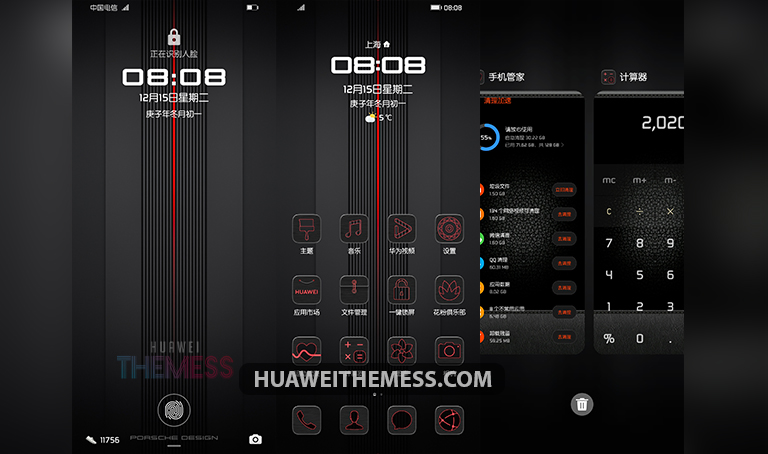
With the Huawei Mate 40 RS EMUI theme, you’ll be treated to a visually stunning experience that’s bursting with style and sophistication. From its sleek dark gray and red accents to its premium leather-textured app lookings, every element comes together to create a seamless and cohesive design that’s sure to impress.
But that’s not all – this theme also boasts a range of exciting features, including cool RS line wallpapers, changed widgets, and a brand-new lockscreen design. With the Huawei Mate 40 RS EMUI theme, you’ll be able to personalize your device to perfection and enjoy a truly unique and premium experience.
Compatibility: EMUI 11 and MagicUI 4 Supported
The Huawei Mate 40 RS EMUI theme is compatible with EMUI 11 and MagicUI 4, making it the perfect choice for users looking to upgrade their device’s look and feel. Whether you’re a fan of Huawei’s latest software or prefer the more minimalist MagicUI 4, this theme has got you covered.



Frequently Asked Questions (FAQ)
What are the system requirements for the Huawei Mate 40 RS EMUI theme?
The Huawei Mate 40 RS EMUI theme is compatible with EMUI 11 and MagicUI 4, making it the perfect choice for users looking to upgrade their device’s look and feel.
How do I apply the theme to my device?
To apply the theme, simply download the .hwt file, move it to the Huawei/Themes folder, and then apply it via the Themes app.
Is the Huawei Mate 40 RS EMUI theme free to download?
Yes, the Huawei Mate 40 RS EMUI theme is free to download and can be found on our website.
How to install this theme?
First, download the .hwt file and move it to the Huawei/Themes folder, then apply it via the Themes app. Click here to learn in detail.
The Huawei Mate 40 RS EMUI theme is a true masterpiece that’s sure to elevate your device’s look and feel. With its sleek and sophisticated design, this theme is perfect for anyone looking to add a touch of luxury to their device. Whether you’re a fan of Huawei’s latest software or prefer the more minimalist MagicUI 4, this theme has got you covered.



Good