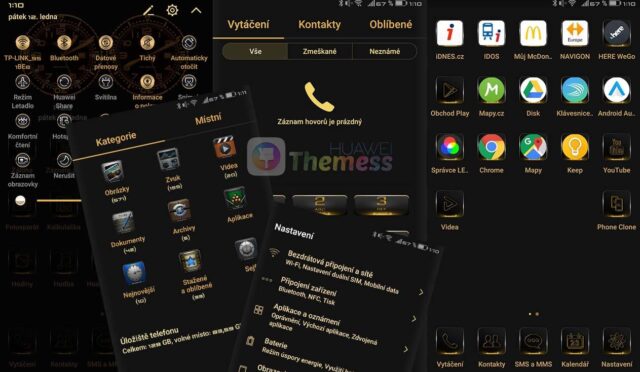
The Batman Dark Theme v2 for EMUI 4.0/4.1 devices is a must-have for fans of the Caped Crusader. This theme boasts a sleek and modern design, with dark MIUI icons, a modified font, and a striking wallpaper that sets the tone for an immersive experience.
From the moment you apply the theme, you’ll feel like you’re part of the Dark Knight’s world. The dark MIUI icons and modified font create a cohesive look that’s both visually appealing and functional.
Compatibility: EMUI 4.0/4.1 Devices Supported
The Batman Dark Theme v2 is specifically designed for EMUI 4.0 and 4.1 devices, ensuring a seamless and hassle-free installation process. Whether you’re rocking a mid-range or high-end device, this theme is sure to bring a touch of sophistication to your home screen.
Frequently Asked Questions (FAQ)
What devices are compatible with the Batman Dark Theme v2?
The Batman Dark Theme v2 is compatible with EMUI 4.0 and 4.1 devices, including the Huawei P9, P9 Lite, and other compatible models.
Can I customize the theme further?
While the theme comes with a pre-configured design, you can always customize the wallpaper, icons, and other elements to suit your personal preferences.
How do I install the Batman Dark Theme v2?
First, download the .hwt file and move it to the Huawei/Themes folder, then apply it via the Themes app. Click here to learn in detail.
In conclusion, the Batman Dark Theme v2 is a must-have for EMUI 4.0/4.1 device owners who want to experience the Dark Knight’s world on their home screen. With its sleek design, dark MIUI icons, and modified font, this theme is sure to bring a touch of sophistication to your device.