
Get ready to transform your Huawei device into a sleek, high-end iOS experience with the iPhone iOS 16 Theme. This stunning theme brings the premium look and feel of Apple‘s latest OS to your EMUI 12/11/10/9 and MagicUI 5/4/3/2 device, complete with a range of eye-catching features that will make your phone stand out from the crowd.
iPhone iOS 16 EMUI Theme Features
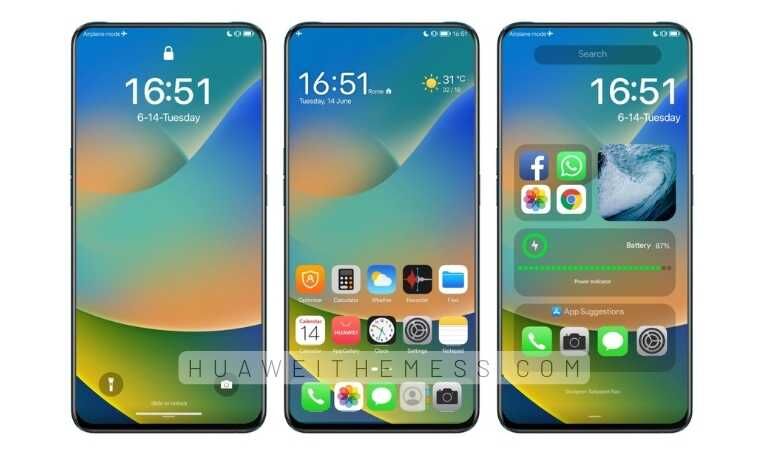
From the moment you install the iPhone iOS 16 Theme, you’ll be greeted by a sophisticated new look that’s inspired by the latest Apple iOS release. With its clean design and vibrant color scheme, this theme is perfect for anyone who wants to give their device a premium feel without the premium price tag. Some of the standout features of the iPhone iOS 16 Theme include:
- iOS 16 Icons
- New iPhone iOS 16 App looking
- Premium lock screens and Widgets
- Amazing iOS 16 Wallpapers
- and more…
iPhone iOS 16 EMUI Theme Compatibility
The iPhone iOS 16 Theme is compatible with EMUI 12/11/10/9 and MagicUI 5/4/3/2, making it easy to download and install on your Huawei device. Whether you’re running the latest version of EMUI or an older release, this theme is designed to provide a seamless and high-quality experience that you’ll love.



Frequently Asked Questions (FAQ)
What devices is the iPhone iOS 16 Theme compatible with?
The iPhone iOS 16 Theme is compatible with EMUI 12/11/10/9 and MagicUI 5/4/3/2 devices.
How do I download the iPhone iOS 16 Theme?
To download the iPhone iOS 16 Theme, simply click the download button below and follow the instructions to install the theme on your device.
How do I apply the iPhone iOS 16 Theme?
To apply the iPhone iOS 16 Theme, follow these simple steps: restart your device after applying the theme. Then, find the ‘HWT’ extension (blabla.hwt) you downloaded from the download site, copy or move the theme file you find in the file manager, and copy or move the folder HWThemes.
How to install this theme?
First, download the .hwt file and move it to the Huawei/Themes folder, then apply it via the Themes app. Click here to learn in detail.
The iPhone iOS 16 Theme is a game-changer for anyone who wants to give their Huawei device a premium look without the premium price tag. With its clean design, vibrant color scheme, and range of eye-catching features, this theme is perfect for anyone who wants to stand out from the crowd and experience the best of iOS on their EMUI device.



I want to install iPhone Ios on my Huawei phone
more Ios 16 themes please
Amazing themes