Get ready to transform your Huawei device into a luxurious haven with the Gold Premium EMUI theme. This stunning theme is designed to provide an unparalleled premium experience, perfect for those who crave a touch of sophistication and elegance on their device.
Gold Premium EMUI Theme: Unveiling the Ultimate Premium Experience
The Gold Premium EMUI theme is a masterpiece of design, featuring a dark and gold looking lockscreen, gold and black all apps, new gold icons, and new widgets. The theme’s sleek and modern design is sure to impress, making it the perfect choice for those who want to elevate their device’s look and feel.
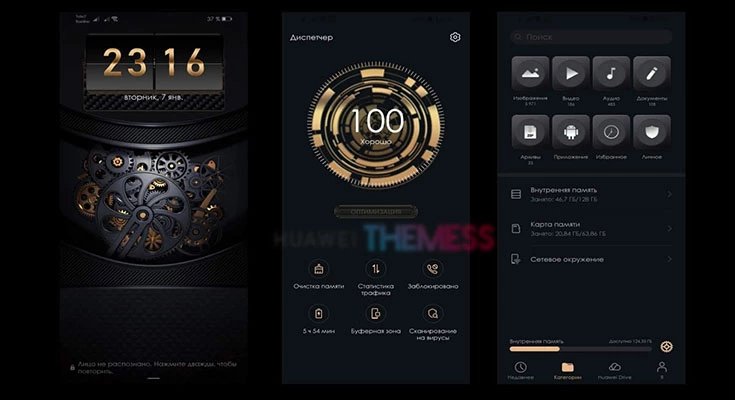
The Gold Premium EMUI theme is designed to provide a seamless and intuitive user experience, with a focus on simplicity and elegance. The theme’s modern design and sleek animations make it a joy to use, while the gold and black color scheme adds a touch of luxury and sophistication.
Compatibility: Supported EMUI Versions
The Gold Premium EMUI theme is compatible with EMUI 10, EMUI 9.1, and EMUI 9, making it the perfect choice for a wide range of Huawei devices. Whether you’re running the latest EMUI 10 or an older version, this theme is sure to work seamlessly on your device.
Frequently Asked Questions (FAQ)
What devices is the Gold Premium EMUI theme compatible with?
The Gold Premium EMUI theme is compatible with a wide range of Huawei devices running EMUI 10, EMUI 9.1, and EMUI 9.
How do I apply the Gold Premium EMUI theme?
To apply the theme, simply download the .hwt file, move it to the Huawei/Themes folder, and then apply it via the Themes app.
Can I customize the Gold Premium EMUI theme?
While the theme is designed to provide a seamless user experience, some customization options are available. You can adjust the theme’s settings to suit your preferences, but be sure to restart your device after applying the theme.
How to install this theme?
First, download the .hwt file and move it to the Huawei/Themes folder, then apply it via the Themes app. Click here to learn in detail.
In conclusion, the Gold Premium EMUI theme is a stunning addition to any Huawei device. With its sleek design, modern animations, and luxurious gold and black color scheme, this theme is sure to elevate your device’s look and feel. Whether you’re running EMUI 10, EMUI 9.1, or EMUI 9, this theme is a must-have for anyone who wants to experience the best of Huawei’s premium design.