This EMUI 5.0/5.1 theme is a must-try for anyone seeking a fresh, streamlined look for their Huawei device. The Blur Theme offers a captivating visual experience, replete with subtle design elements that elevate the overall aesthetic of your phone’s interface.
Embracing the Vibrant EMUI 5.0/5.1 Vibe with Blur Theme
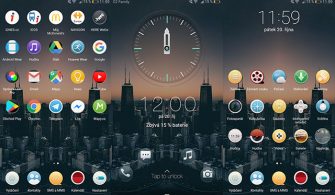
With the Blur Theme, you’ll be immersed in a world of sleek, modern design, as seen in this captivating screenshot of the theme’s home screen:
One of the standout features of the Blur Theme is its innovative use of blur effects, blending seamlessly with the device’s native interface to create a truly premium look and feel. The result is a visually stunning experience that’s sure to turn heads.
Compatibility and System Requirements
The Blur Theme is designed to work seamlessly with EMUI 5.0/5.1, ensuring a smooth and effortless installation process. With its compatibility with the latest EMUI versions, you can be confident that you’ll be able to enjoy this theme without any issues.
Frequently Asked Questions
What are the system requirements for this theme?
The Blur Theme is compatible with EMUI 5.0/5.1, making it the perfect choice for users running the latest version of EMUI.



How do I install this theme?
First, download the .hwt file and move it to the Huawei/Themes folder, then apply it via the Themes app. Click here to learn in detail.
Is this theme free to download?
Yes, the Blur Theme is free to download and install on your Huawei device.
How to install this theme?
First, download the .hwt file and move it to the Huawei/Themes folder, then apply it via the Themes app. Click here to learn in detail.
The Blur Theme is a game-changer for EMUI 5.0/5.1 users, offering a unique blend of style and functionality that’s sure to elevate your mobile experience. Whether you’re looking for a fresh new look or simply want to experience the best of EMUI, this theme is an absolute must-try.