
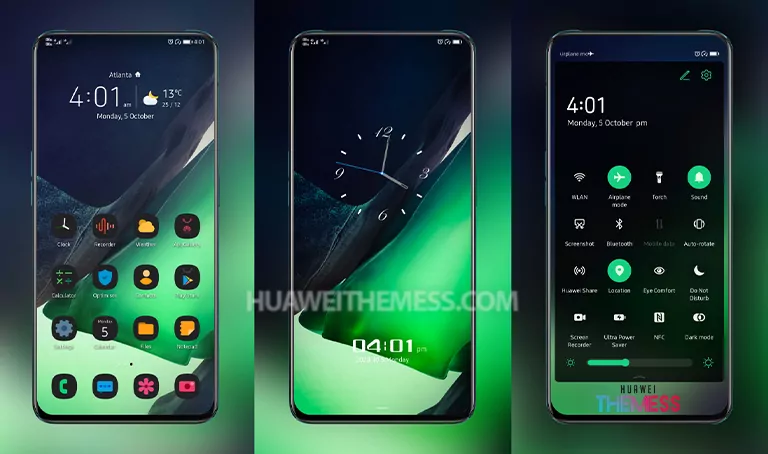
Get ready to elevate your Huawei device’s aesthetic with the stunning Luolan theme! This sleek and modern UI setup is designed to give your device a premium feel, making it perfect for those who want to experience a more refined and polished look. With its clean design and attention to detail, Luolan is the perfect choice for anyone looking to give their Huawei device a fresh new look.
Luolan EMUI Theme Features: A Symphony of Style and Functionality
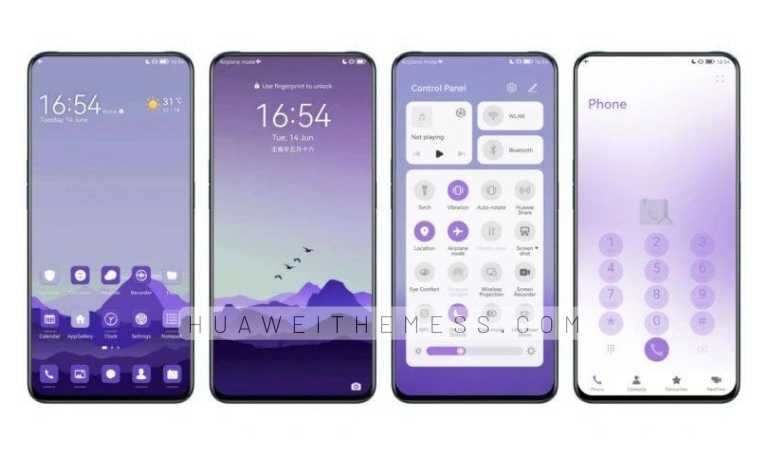
The Luolan theme for EMUI 12, 11, 10.1, 10, 9.1, and 9.0, as well as MagicUI 5, 4, 3, and 2, boasts an impressive array of features that set it apart from other themes. Some of the standout features include:
- New and exciting wallpapers
- Customizable app icons
- A sleek and modern interface
- A dynamic and cool lockscreen
- A smooth and seamless user experience
- Bugs fixed for a more stable performance
Luolan EMUI Theme Compatibility: A Wide Range of Devices Supported
The Luolan theme is compatible with a wide range of Huawei and Honor devices, making it a great choice for anyone looking to give their device a fresh new look. The theme is specifically designed for EMUI 12, 11, 10.1, 10, 9.1, and 9.0, as well as MagicUI 5, 4, 3, and 2.
Frequently Asked Questions (FAQ)
What is the Luolan theme?
Luolan is a stunning UI theme designed for Huawei and Honor devices, offering a sleek and modern aesthetic that is sure to elevate your device’s look and feel.



Is the Luolan theme compatible with my device?
Yes, the Luolan theme is compatible with a wide range of Huawei and Honor devices, including EMUI 12, 11, 10.1, 10, 9.1, and 9.0, as well as MagicUI 5, 4, 3, and 2.
How do I download the Luolan theme?
You can download the Luolan theme by clicking on the link provided below. The theme is available in .hwt format, which can be easily installed on your device.
How to install this theme?
First, download the .hwt file and move it to the Huawei/Themes folder, then apply it via the Themes app. Click here to learn in detail
With its stunning design and wide range of features, the Luolan theme is a must-have for anyone looking to give their Huawei device a fresh new look. So why wait? Download the Luolan theme today and experience the ultimate clean UI setup for yourself!



Huawei Theme is working. Thxx
Best Theme!! Thank you