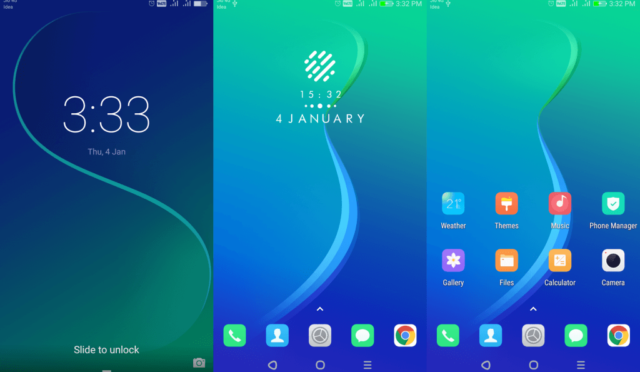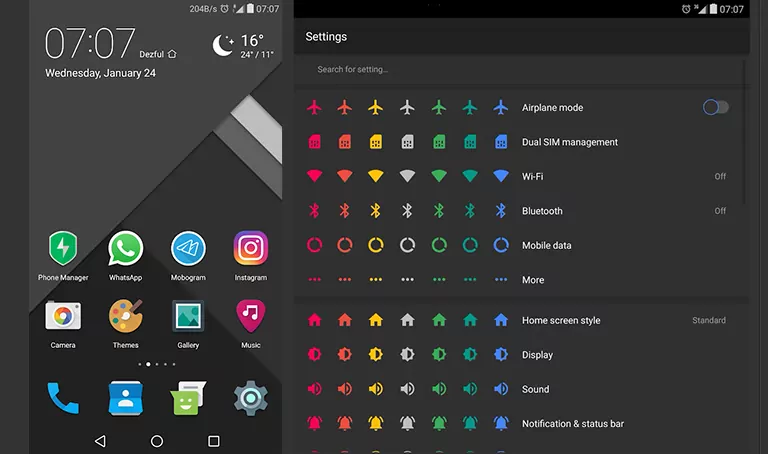
Distant-Beta theme is a refreshing twist on EMUI 5.0/5.1/8.0, bringing a unique blend of modern design elements that will captivate users of all ages. With its sleek minimalist approach, this theme is sure to inject a cool and vibrant vibe into your daily mobile experience.
Unlock the Full Potential of Distant-Beta Theme
- New Blue Cool wallpapers that will transport you to a world of tranquility
- Sleek and Simple Icons that exude a sense of sophistication
- Refined Fonts that add a touch of elegance to your device
- New Navbars that provide a seamless user experience
- A Refreshing Visual Identity that sets you apart from the crowd
- Redesigned Lockscreen that greets you with a smile every morning
- And many more exciting features that will make your device stand out
Ensuring Seamless Compatibility
The Distant-Beta theme is designed to work seamlessly with EMUI 5.0, 5.1, and 8.0, providing users with a hassle-free experience. With its wide range of supported versions, you can enjoy this stunning theme without worrying about compatibility issues.
Frequently Asked Questions
Is the Distant-Beta theme compatible with EMUI 5.0/5.1/8.0 devices?
Yes, the Distant-Beta theme is compatible with EMUI 5.0, 5.1, and 8.0 devices.
How can I download the Distant-Beta theme?
You can download the Distant-Beta theme by clicking the link provided below. If you need help with the download process, refer to the guide below.
How do I install the Distant-Beta theme on my Huawei device?
First, download the .hwt file and move it to the Huawei/Themes folder, then apply it via the Themes app. Click here to learn in detail.
The Distant-Beta theme is a game-changer for EMUI 5.0/5.1/8.0 users, offering a unique blend of modern design elements and a refreshing visual identity. With its wide range of features and seamless compatibility, this theme is sure to captivate users of all ages.