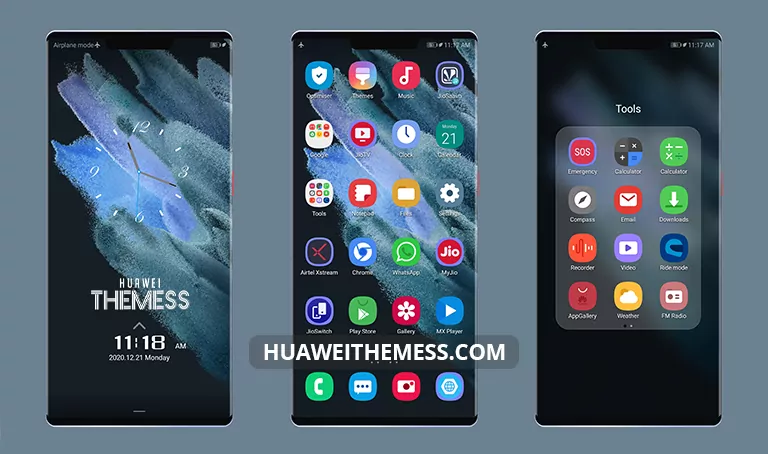
Get ready to dive into a world of sleek sophistication with the Dark Silk theme, expertly crafted for EMUI 11.1/11, HarmonyOS, and Magic UI 4 users. This theme is the perfect blend of elegance and functionality, allowing you to personalize your device according to your unique taste.
Dark Silk EMUI Theme Features
This theme offers a wide range of features that will revolutionize your EMUI experience. With 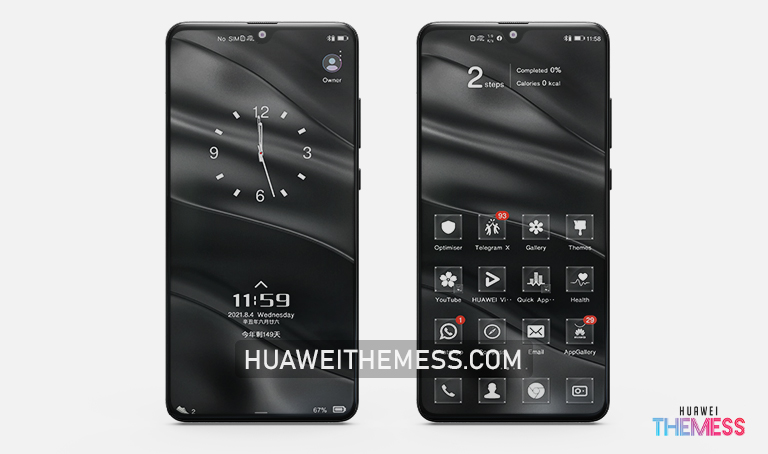 Material Icons, Abstract Wallpapers, and a Cool Looking design, you’ll be treated to a visual feast like no other. Plus, with bugs fixed and many more exciting features, you’ll be wondering how you ever managed without Dark Silk.
Compatibility and Support
The Dark Silk theme is designed to be compatible with EMUI 11.1/11, HarmonyOS, and Magic UI 4, ensuring a seamless user experience across various platforms. Whether you’re a fan of EMUI or HarmonyOS, this theme has got you covered.
Frequently Asked Questions (FAQ)
What are the system requirements for installing the Dark Silk theme?
The Dark Silk theme is compatible with EMUI 11.1/11, HarmonyOS, and Magic UI 4. Please ensure that your device is running one of these operating systems to enjoy the full benefits of this theme.
How do I download the Dark Silk theme?
To download the Dark Silk theme, simply click on the download button below. Once downloaded, you can find the .hwt file in your file manager. Move the theme file to the Huawei/Themes folder, and then apply it via the Themes app.



How do I add the Dark Silk theme to my EMUI device?
To add the Dark Silk theme to your EMUI device, follow these steps: first, download the .hwt file and move it to the Huawei/Themes folder, then apply it via the Themes app. Click here to learn in detail about how to install themes on your Huawei device.
How to install this theme?
First, download the .hwt file and move it to the Huawei/Themes folder, then apply it via the Themes app. Click here to learn in detail.
In conclusion, the Dark Silk theme is a game-changer for EMUI 11/HarmonyOS and Magic UI 4 users. With its sophisticated style, Material Icons, Abstract Wallpapers, and Cool Looking design, you’ll be treated to a visual feast like no other. So, what are you waiting for? Download the Dark Silk theme today and elevate your EMUI experience to new heights!