Assassin’s Creed Aesthetic Setup: Exploring Cool Red Icons and New Lockscreen Style on your Huawei/Honor Device
The Assassin’s Creed theme is perfect for fans of the popular video game series. With its sleek design and cool red icons, this theme will give your device a premium look and feel. The theme includes Assassin’s Creed wallpapers, a new lockscreen style, and changed font, making it a must-have for anyone looking to personalize their phone.
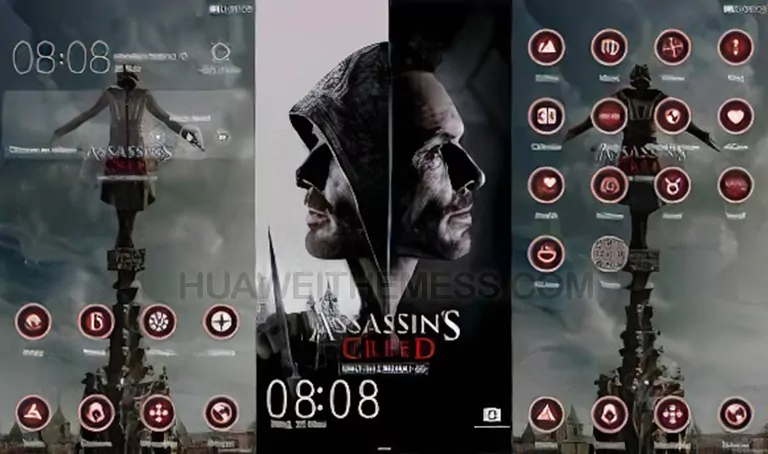
- Assassin’s Creed Wallpapers
- Changed Font
- New Lockscreen Style
- Cool Red Icons
- Bugs Fixed
- and more
Assassin’s Creed EMUI Theme Compatibility
This theme is compatible with EMUI 4.0/4.1 devices and is available for download on our website. Please note that this theme may not be compatible with other versions of EMUI or other Huawei/Honor devices.
Frequently Asked Questions
What devices is this theme compatible with?
This theme is compatible with EMUI 4.0/4.1 devices.



Do I need to restart my device after applying the theme?
Yes, please restart your device after applying the theme.
How to install this theme?
First, download the .hwt file and move it to the Huawei/Themes folder, then apply it via the Themes app. Click here to learn in detail.
The Assassin’s Creed theme is a great choice for anyone looking to personalize their Huawei/Honor device. With its sleek design and cool red icons, this theme will give your device a premium look and feel. The theme includes Assassin’s Creed wallpapers, a new lockscreen style, and changed font, making it a must-have for anyone looking to decorate their phone with an awesome look and style.